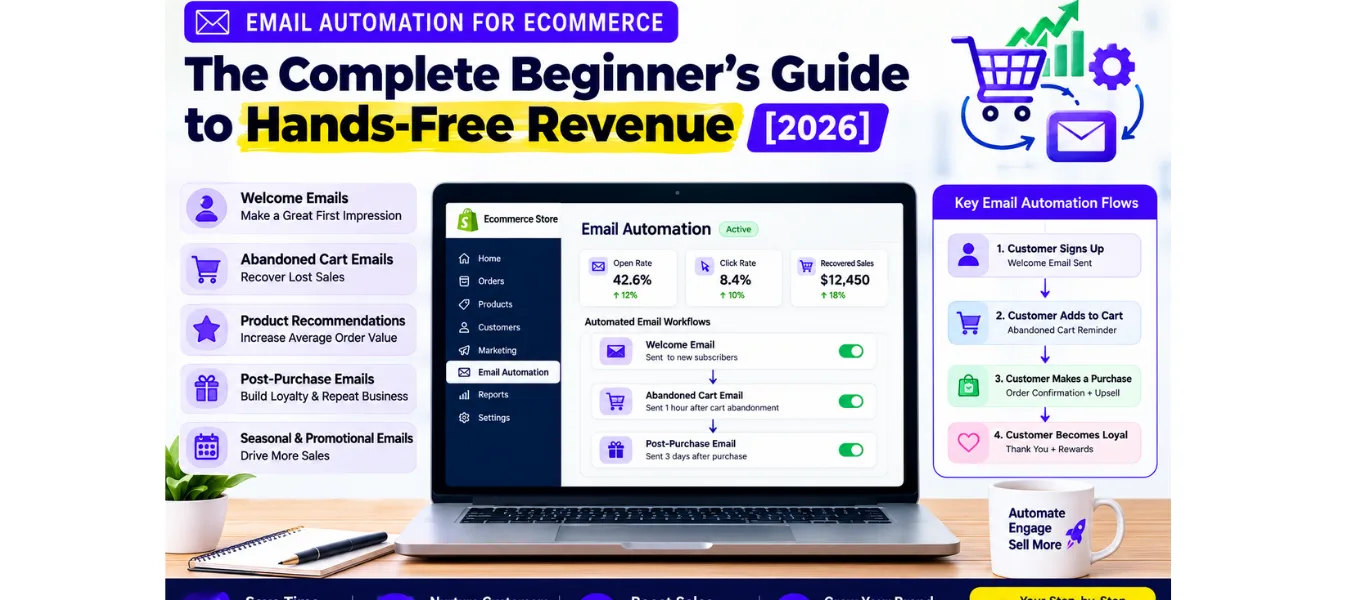
Email Automation for Ecommerce: The Complete Beginner’s Guide to Hands-Free Revenue [2026]
If you’re running an ecommerce store and still sending emails manually, you’re leaving money on the table. Every. Single. Day.
Here’s the truth most online store owners don’t realize: email automation isn’t just a “nice-to-have” — it’s the silent revenue engine that separates struggling brands from 7-figure ecommerce empires.
The brands crushing it right now? They’ve built automated email sequences that work 24/7 — recovering abandoned carts, welcoming new subscribers, nurturing leads, and driving repeat purchases — all while they sleep.
And the best part? You don’t need to be a tech wizard or hire an expensive agency to set this up.
In this email automation for e-commerce beginners guide, I’ll show you exactly how to set up email automation for your online store, which emails to automate first, the best tools for beginners, and the deadly mistakes that kill your results before you even start.
Let’s turn your inbox into an ATM.
What Is Email Automation for Ecommerce?
Email automation is the process of sending targeted, triggered emails to your subscribers automatically — based on their behavior, preferences, or where they are in your customer journey.
Instead of manually typing and sending every email, you build email automation workflows (also called “flows” or “sequences”) that fire on autopilot when a specific action happens.
For example:
-
A visitor abandons their cart → an abandoned cart email sends automatically 1 hour later
-
Someone subscribes to your list → a welcome email sequence triggers instantly
-
A customer makes a purchase → a post-purchase follow-up sends 3 days later
Think of it as hiring a relentless, 24/7 sales assistant who never sleeps, never forgets, and never misses an opportunity to convert.
Email Automation vs Manual Emailing: What’s the Difference?
Why Email Automation Matters for Ecommerce Beginners
Let me hit you with some numbers that will change how you think about your email list:
-
Email marketing generates $36 for every $1 spent — the highest ROI of any marketing channel
-
Automated emails generate 320% more revenue than non-automated emails
-
Welcome emails have a 50-60% open rate — the highest of any email type
-
Abandoned cart emails recover 10-15% of otherwise lost sales
-
Email drives 20-30% of total revenue for top-performing ecommerce brands
But here’s what those stats don’t tell you: the brands seeing these results aren’t working harder. They’re working smarter.
They’ve built simple email automation flows that handle the heavy lifting. And as a beginner, you have a massive advantage: you can build these systems correctly from day one, instead of trying to fix a broken setup later.
The Hidden Cost of NOT Automating
Every day you delay email automation, you’re hemorrhaging revenue in three ways:
-
Abandoned carts go unrecovered — 70% of online shoppers abandon their cart. Without automation, that revenue is gone forever.
-
New subscribers go cold — Someone joins your list, gets nothing valuable, and forgets you exist within 48 hours.
-
One-time buyers never return — You worked hard (and paid) to acquire that customer. Without post-purchase automation, they buy once and vanish.
Email automation ROI for small ecommerce business isn’t just about making more money — it’s about stopping the silent bleeding that’s already happening.
The 5 Essential Email Automations Every Online Store Needs
You don’t need 50 automated emails to start seeing results. You need 5 core flows that cover the entire customer lifecycle. Master these, and you’ll outperform 90% of ecommerce brands.
1. Welcome Email Sequence
Trigger: Someone subscribes to your email list Goal: Introduce your brand, build trust, and drive the first purchase
Your welcome email sequence is the most profitable automation you’ll ever build. Here’s why:
-
Welcome emails have 4x the open rate and 5x the click-through rate of standard promotional emails
-
Subscribers who receive a welcome series are 33% more engaged long-term
-
74% of consumers expect a welcome email immediately after subscribing
Your welcome sequence should include:
-
Email 1 (Immediate): “Welcome + Here’s what to expect” — Set expectations, deliver any lead magnet, and introduce your brand story
-
Email 2 (Day 2): “Your biggest problem + our solution” — Agitate a pain point and position your product as the answer
-
Email 3 (Day 4): “Social proof + best-sellers” — Reviews, testimonials, and your most popular products
-
Email 4 (Day 6): “Exclusive first-purchase offer” — A time-sensitive discount to convert subscribers into buyers
Pro tip: Don’t just say “Welcome to our newsletter.” That’s what everyone does. Instead, open with a pattern interrupt — something unexpected that stops the scroll and demands attention.
2. Abandoned Cart Recovery
Trigger: Someone adds items to cart but doesn’t complete checkout Goal: Recover lost sales and bring shoppers back to complete their purchase
This is the highest-ROI email automation you can build.
Here’s the math: If your average order value is $50 and you recover just 10% of 100 abandoned carts per month, that’s an extra $500/month — from ONE automated email.
Your abandoned cart sequence:
-
Email 1 (1 hour later): “You forgot something” — Gentle reminder with cart contents and a clear CTA
-
Email 2 (24 hours later): “Still thinking about it?” — Address objections, add social proof
-
Email 3 (48-72 hours later): “Last chance + small incentive” — Urgency + a 10% discount or free shipping
Power words that work in abandoned cart subject lines:
-
“You left something behind…”
-
“Your cart is getting lonely”
-
“Only [X] left in your size”
-
“Don’t let this slip away”
3. Post-Purchase Follow-Up
Trigger: Customer completes a purchase Goal: Reduce buyer’s remorse, encourage reviews, and drive repeat purchases
Most ecommerce brands say “thank you” and disappear. That’s a catastrophic mistake.
The post-purchase period is when customers are most engaged. Strike while the iron is hot:
-
Email 1 (Immediately): Order confirmation + “What happens next” — Set expectations for shipping
-
Email 2 (3-5 days after delivery): “How’s everything?” — Check in, ask for feedback, offer support
-
Email 3 (7-10 days after delivery): “Leave a review + get a reward” — Reviews boost conversions for future buyers
-
Email 4 (2-3 weeks later): “You might also love…” — Cross-sell or upsell related products
This sequence transforms one-time buyers into loyal, repeat customers who spend 67% more on average than first-time buyers.
4. Browse Abandonment
Trigger: Someone views a product but doesn’t add to cart Goal: Re-engage interested shoppers before they forget about you
Browse abandonment emails are the secret weapon of top ecommerce brands. They catch shoppers who showed interest but didn’t commit.
-
Email 1 (1 hour later): “Still interested in [Product Name]?” — Show the exact product they viewed
-
Email 2 (24 hours later): “Here’s why customers love it” — Social proof, reviews, and scarcity
-
Email 3 (48 hours later): “Popular items selling fast” — Create urgency with low-stock messaging
5. Win-Back Campaign
Trigger: Customer hasn’t purchased in 60-90 days Goal: Re-engage dormant customers before they churn permanently
It’s 5-25x more expensive to acquire a new customer than to retain an existing one. Yet most brands ignore their dormant customers.
Your win-back sequence:
-
Email 1 (Day 60): “We miss you” — Personalized, emotional re-engagement
-
Email 2 (Day 75): “Here’s what you missed” — New products, updates, or improvements
-
Email 3 (Day 90): “One last try” — A compelling “we’d hate to lose you” offer
-
Email 4 (Day 105): “Should we say goodbye?” — Final attempt with an unsubscribe option (cleans your list)
How to Set Up Email Automation for Your Online Store (Step-by-Step)
Now that you know WHAT to automate, let’s talk about HOW to set it up. This email automation setup for shopify store step by step works for any platform — Shopify, WooCommerce, BigCommerce, or Squarespace.
Step 1: Choose Your Email Automation Tool
For beginners, I recommend starting with one of these three:
Klaviyo — The gold standard for ecommerce email automation. Deep Shopify integration, powerful segmentation, and built-in analytics. Best for brands ready to scale.
Mailchimp — User-friendly with a generous free plan. Great for absolute beginners, though less powerful for advanced automation.
Omnisend — Built specifically for ecommerce. Excellent pre-built automation templates and competitive pricing.
My recommendation for beginners: Start with Klaviyo if you’re on Shopify. The learning curve is worth it, and you won’t outgrow it.
Step 2: Connect Your Store
Most email automation tools integrate directly with your ecommerce platform:
-
Install the app/plugin from your platform’s app store
-
Connect your store with one click
-
Sync your customer data, order history, and product catalog
This sync is what makes behavioral email automation possible — the tool knows who bought what, when, and can trigger emails accordingly.
Step 3: Set Up Your Email List and Segments
Don’t blast your entire list with the same message. Segmentation is what separates amateur email marketers from pros.
Start with these basic segments:
-
New subscribers (joined in last 7 days)
-
Customers (made at least one purchase)
-
VIP customers (spent $X+ or made 3+ purchases)
-
Cart abandoners (added to cart but didn’t buy)
-
Inactive subscribers (no opens in 60+ days)
Step 4: Build Your First Automation Flow
Let’s build your welcome email sequence as an example:
-
Create a new flow in your email tool
-
Set the trigger: “When someone subscribes to list”
-
Add time delays between emails (e.g., 2 days, 4 days, 6 days)
-
Write your emails using the framework from Section 3
-
Add conditional splits (e.g., “If subscriber made a purchase → exit flow”)
-
Activate the flow and monitor performance
Step 5: Test, Measure, and Optimize
Email automation isn’t “set it and forget it.” You need to monitor these metrics:
| Metric | Benchmark | What It Tells You |
|---|---|---|
| Open Rate | 15-25% | Subject line effectiveness |
| Click-Through Rate (CTR) | 2-5% | Body copy + CTA strength |
| Conversion Rate | 1-3% | Overall email profitability |
| Revenue Per Email | Varies | The ultimate success metric |
| Unsubscribe Rate | <0.5% | Content relevance |
A/B test everything: Subject lines, send times, CTA buttons, email length. Small improvements compound into massive revenue gains.
Best Email Automation Tools for Ecommerce Beginners
Choosing the right tool can make or break your email automation success. Here’s a quick comparison:
Klaviyo
-
Best for: Shopify stores ready to scale
-
Pricing: Free up to 250 contacts; paid plans from $20/month
-
Pros: Deep ecommerce integration, advanced segmentation, powerful analytics
-
Cons: Steeper learning curve, can get expensive as list grows
Mailchimp
-
Best for: Absolute beginners on a budget
-
Pricing: Free up to 500 contacts; paid from $13/month
-
Pros: Easy to use, great templates, generous free plan
-
Cons: Limited ecommerce features, weaker automation compared to competitors
Omnisend
-
Best for: Ecommerce brands wanting pre-built workflows
-
Pricing: Free up to 250 contacts; paid from $16/month
-
Pros: Ecommerce-focused, excellent automation templates, SMS integration
-
Cons: Less customizable than Klaviyo
ConvertKit
-
Best for: Content creators and smaller brands
-
Pricing: Free up to 1,000 contacts; paid from $9/month
-
Pros: Simple, visual automation builder, great for beginners
-
Cons: Less powerful for advanced ecommerce needs
My verdict for beginners: Start with Klaviyo if you’re serious about growth. The Klaviyo email automation for beginners resources are extensive, and you won’t need to migrate later.
Email Automation Examples for Ecommerce Stores
Sometimes the best way to learn is to see what works. Here are email automation examples for ecommerce stores that drive real results:
Example 1: Fashion Brand Welcome Sequence
Subject: “Welcome to [Brand] — here’s 15% off your first order” Result: 62% open rate, 18% CTR, $4.20 revenue per email
Example 2: Skincare Brand Abandoned Cart
Subject: “Your skin will thank you later 💆” Result: 45% open rate, 12% CTR, 8.5% recovery rate
Example 3: Home Goods Post-Purchase
Subject: “How to style your new [Product] (3 ideas inside)” Result: 38% open rate, 9% CTR, 22% repeat purchase rate within 30 days
Example 4: Fitness Supplement Win-Back
Subject: “We noticed you haven’t re-upped — everything okay?” Result: 28% open rate, 5.5% CTR, reactivated 15% of dormant customers
The common thread? Every email feels personal, not promotional. They don’t scream “BUY NOW.” They solve problems, offer value, and make the reader feel understood.
Email Automation Mistakes to Avoid for New Ecommerce Brands
I’ve audited hundreds of ecommerce email setups. Here are the email automation mistakes to avoid for new ecommerce brands that I see over and over:
Mistake #1: Sending the Same Email to Everyone
The fix: Segment your list from day one. Even basic segmentation (customers vs. non-customers) can increase revenue by 760%.
Mistake #2: Ignoring Mobile Optimization
The fix: 60%+ of emails are opened on mobile. Preview every email on your phone before sending.
Mistake #3: Setting and Forgetting
The fix: Review your flows monthly. Check open rates, CTR, and revenue. Kill what doesn’t work. Double down on what does.
Mistake #4: Weak Subject Lines
The fix: Your subject line is a headline. It needs curiosity, urgency, or personalization. Never settle for “Monthly Newsletter.”
Mistake #5: No Clear Call-to-Action
The fix: Every email should have ONE clear next step. “Shop now,” “Read the guide,” “Claim your discount” — not three competing CTAs.
Mistake #6: Buying Instead of Building Your List
The fix: Never buy email lists. It’s illegal (GDPR, CAN-SPAM), destroys deliverability, and generates zero revenue. Build organically.
Mistake #7: Neglecting List Hygiene
The fix: Remove inactive subscribers every 6 months. A smaller, engaged list beats a massive, dead list every time.
Email Automation Checklist for New Online Store Owners
Before you launch your first automation, run through this email automation checklist for new online store owners:
-
[ ] Email automation tool connected to your store
-
[ ] Customer data synced (orders, products, behavior)
-
[ ] Email list created and segmented
-
[ ] Welcome email sequence built and tested
-
[ ] Abandoned cart flow activated
-
[ ] Post-purchase sequence configured
-
[ ] All emails mobile-optimized
-
[ ] Subject lines written with power words
-
[ ] Clear CTAs on every email
-
[ ] Tracking and analytics set up
-
[ ] A/B test plan in place
-
[ ] Unsubscribe link included (legally required)
-
[ ] Sender name and “from” address configured
-
[ ] SPF/DKIM authentication set up (for deliverability)
FAQ: Email Automation for Ecommerce Beginners
Q: How much does email automation cost for ecommerce? Most tools start free or under $20/month for small lists. As you scale, expect $50-200/month for lists of 5,000-20,000 subscribers. The ROI is typically 30-40x your investment.
Q: How long does it take to set up email automation? You can have your first 3 core flows (welcome, abandoned cart, post-purchase) live in 2-4 hours. The writing takes longer than the technical setup.
Q: Is email automation worth it for small ecommerce? Absolutely. Small brands often see the HIGHEST ROI from email automation because every recovered cart and repeat purchase matters more at their scale.
Q: What is a drip campaign in ecommerce? A drip campaign is a series of automated emails sent on a schedule (e.g., Day 1, Day 3, Day 7). It’s the same concept as an email automation flow — just a different name.
Q: Can I do email automation for free? Yes! Klaviyo, Mailchimp, and Omnisend all offer free plans for small lists. You can build powerful automations without spending a dime until you grow.
Q: How many emails should I automate? Start with 5 (the ones covered in this guide). Once those are optimized, add browse abandonment, win-back, and birthday flows.
The Bottom Line
Email automation for ecommerce isn’t a futuristic luxury — it’s a present-day necessity. The brands winning in 2026 aren’t the ones with the biggest ad budgets. They’re the ones who built systems that convert subscribers into buyers on autopilot.
You now have the complete blueprint:
-
✅ What email automation is and why it matters
-
✅ The 5 essential automations every store needs
-
✅ Step-by-step setup instructions
-
✅ The best tools for beginners
-
✅ Real examples that drive revenue
-
✅ Mistakes to avoid
-
✅ A ready-to-use checklist
The only thing left? Take action.
Pick one automation. Build it today. Launch it tomorrow. And watch as your email list transforms from a static database into your most profitable sales channel.
About the Author: Jawed Iqbal is an Email Copywriter for Ecommerce brands. He helps online stores turn their email lists into revenue-generating machines through battle-tested automation and conversion-optimized copy.